

Disclosure: This article may contain affiliate links, which means we may earn a commission if you purchase through these links — at no extra cost to you. We are a member of the Amazon Services LLC Associates Program and we earn from qualifying purchases. See our Disclosure Policy for more information.
🕊️ Simple Summary
Your digital afterlife includes your online accounts, digital assets, photos, websites, subscriptions, devices and other information you leave behind. A digital-afterlife plan helps someone know what you have, how to access what they’re authorized to manage, and what you want done with it.
This guide walks you through what to include in your plan, where to keep important access information, what not to overlook, and how to make things easier for the person who may someday have to handle your digital life.
NOTE:
This guide is for general educational purposes only and is not legal or medical advice. Laws and healthcare requirements vary by state, so speak with an attorney or healthcare professional if you need help completing your documents or making decisions about your medical care.
Your digital afterlife is what happens to your online accounts, digital assets, information, devices, and online presence after you die.
And if you think that means Facebook and a list of passwords, you may be surprised by how much you’re leaving out.
We were.
As we started looking at our own digital lives, we thought we were in pretty good shape. We have a list of accounts and creditors. We know where we store our passwords securely. We have access to the phones and email accounts used for two-factor authentication.
We also know each other’s passwords, so if something happened to one of us, the other wouldn’t have to start from scratch. But then we realized our plan depended on one of us still being here. What if something happened to both of us? Would the person handling our affairs know what to do?
That question changed the way we looked at digital-afterlife planning.
Having access to our accounts wasn’t enough. The person stepping into our digital lives would need to understand what we have, how to access it legally, and what we want done with it.
Would they know not to disconnect our phones before checking what accounts depend on them for two-factor authentication? Would they know that an ordinary-looking recurring charge might be protecting years of family photographs? Would they know there could still be money coming in from an account they didn’t even know existed?
Those were the kinds of questions we hadn’t thought about.
That’s basically what a digital-afterlife plan is: a roadmap for the person who may someday have to step into your digital life without you there to explain it. And you don’t have to map your entire digital life today. Start with the things someone would need first, then build from there.
What Is a Digital Afterlife?
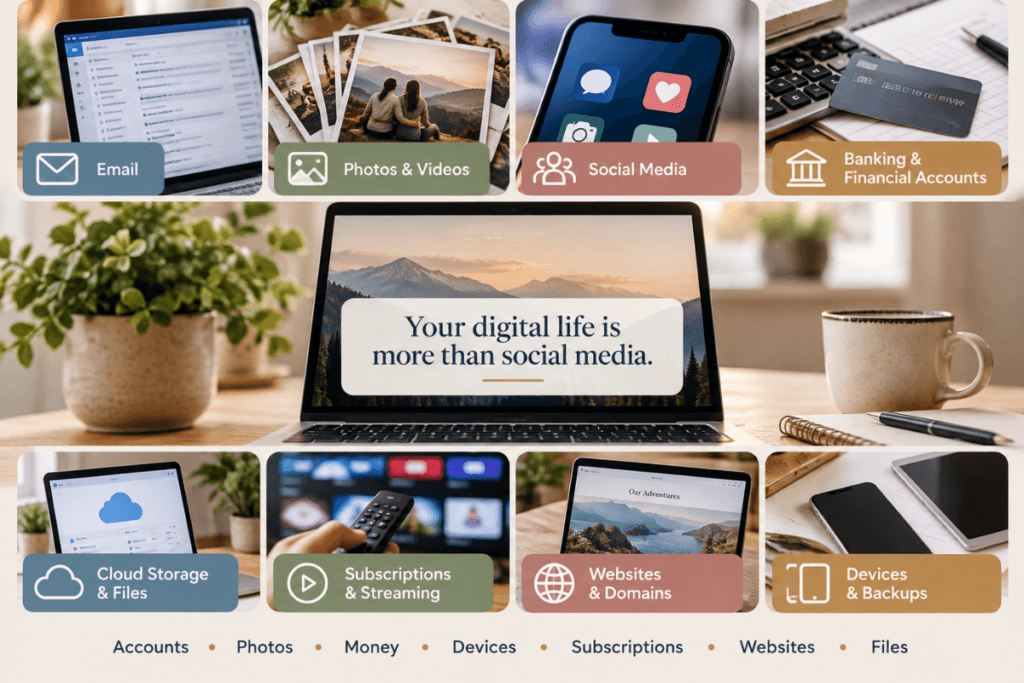
For most of us, our digital afterlife is considerably larger than our social media presence. So much of our everyday life now happens online that we may not even realize how many digital accounts, assets, and connections we’ve accumulated over the years.
It may include:
- Email accounts
- Banking and financial accounts
- Automatic payments
- Social media
- Digital photographs and videos
- Cloud storage
- Phones and computers
- Websites and blogs
- Domain names and hosting
- Online businesses
- Client accounts
- Subscriptions
- Shopping accounts
- Loyalty programs and rewards
- Cryptocurrency
- Digital purchases
- Monetized accounts
- Affiliate accounts
- Unpaid commissions or other income
- Old phones, hard drives, USB drives, and memory cards
You may have only a handful of these. Even if your digital life is mostly email, Facebook, online banking, family photos, shopping accounts, and a smartphone, someone will eventually need to know what matters and what you want done with it.
You don’t need to track it all down today. Start with the accounts, devices and information someone would need immediately, then add the less urgent pieces over time.
Some of these things have financial value. Some have sentimental value. Some provide access to other parts of your digital life. Others simply need someone to know they exist so they can eventually be closed.
And some may disappear without anyone realizing they were there.
A Password List Is Not a Digital Afterlife Plan
Sharing passwords with someone you trust is a good start, but access is only one piece of the puzzle.
Imagine leaving someone a list of 75 usernames and passwords to sort through after your death.
They may be able to get into the accounts, but would they know which ones matter? Would they know what is connected to them? Would they know which accounts are generating income?
Most importantly, would they know what you wanted done with them?
A useful digital-afterlife plan needs to answer three questions.
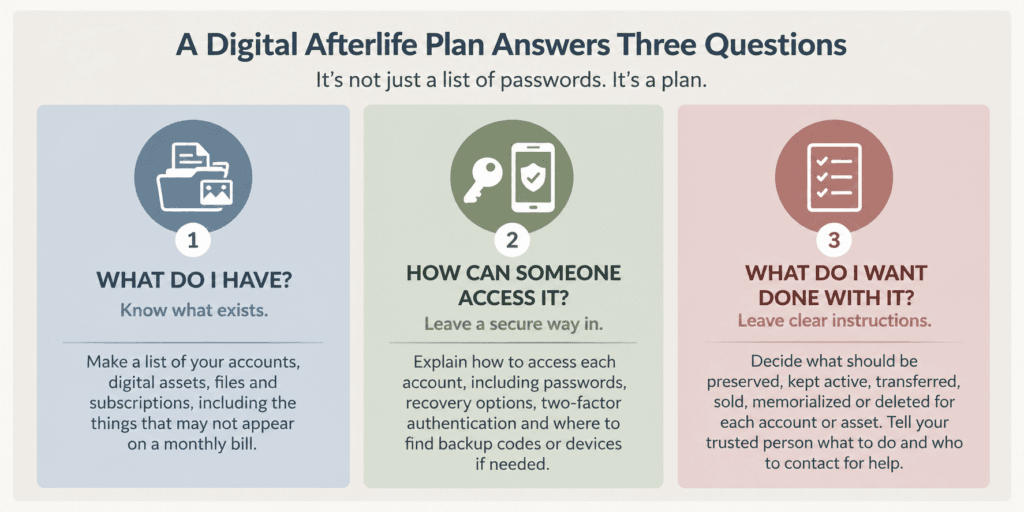
1. What Do I Have?
Someone needs to know what exists.
That includes the obvious things such as banking, email, and social media, but also things that may never appear on a monthly bill.
An old email address might be the recovery address for another account. A cloud-storage account could contain 15 years of family photographs. You might have forgotten rewards points. And if you own a website or earn money online, a domain may renew only once a year, or an affiliate account could still have an unpaid balance.
If nobody knows an account or asset exists, there is a good chance nobody will ever look for it.
2. How Can the Right Person Access It?
Knowing an account exists only helps if the person handling your affairs can actually access it when the time comes. Passwords matter, but they aren’t always enough anymore. Access may also depend on a phone, recovery email, authenticator app, or another security step only you know.
Access may also depend on:
- Your phone or computer passcode
- Two-factor authentication
- An authenticator app
- Recovery email addresses
- Recovery phone numbers
- Backup codes
- Passkeys or security keys
- A password manager
- A cryptocurrency wallet or recovery phrase
- Instructions stored somewhere else
This was one of the holes we found in our own planning.
We could get into most of each other’s accounts. But if something happened to both of us, the person handling our affairs wouldn’t necessarily know our phone passcodes or how to get through that second layer of security.
We can fix that now.
3. What Do I Want Done With It?
Once we knew what we had and how someone could access it, we still needed to decide what we wanted someone to do with our accounts, websites, photos and other digital assets after we were gone.
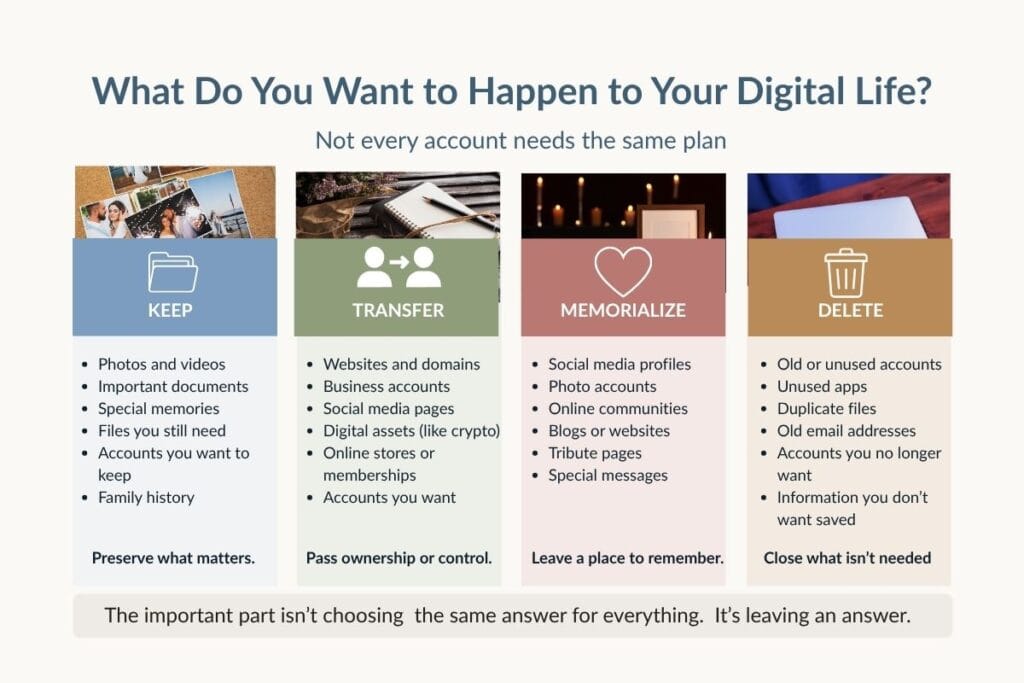
Should an account be:
- Preserved?
- Kept open temporarily?
- Transferred?
- Sold?
- Given to someone?
- Reviewed before deciding?
- Closed or deleted?
As we worked through these questions, we realized we still needed to make some decisions. We couldn’t expect someone settling our affairs to know what we wanted if we hadn’t taken the time to decide for ourselves and leave clear instructions.
Where Should You Keep Your Digital Afterlife Plan?
Your digital-afterlife plan needs to be somewhere your trusted person can find and use, but that doesn’t mean every password, recovery code, and piece of sensitive information should be written directly into the plan.
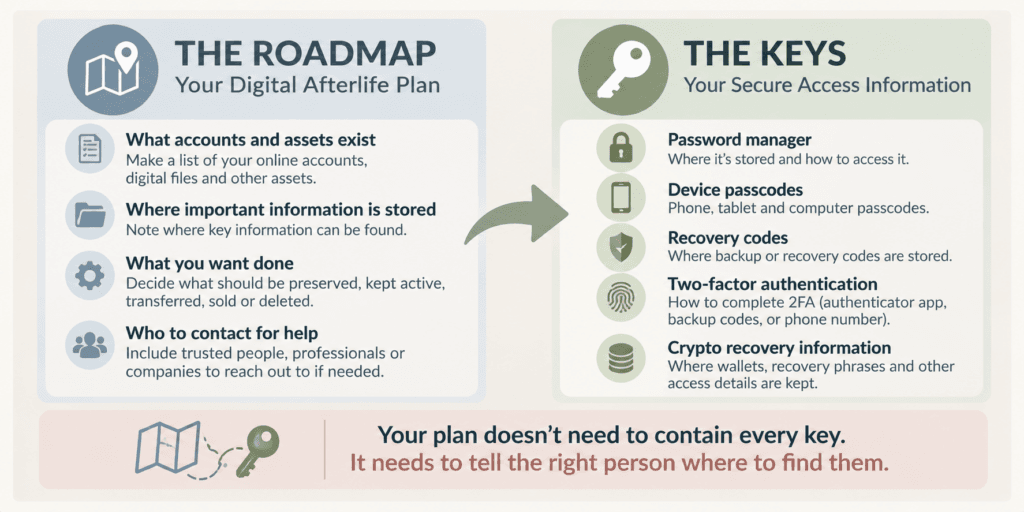
Think of your plan as the roadmap, and your passwords and other credentials as the keys. The roadmap can tell someone where the keys are securely stored without putting all of those keys in one place.
For example, your plan might explain:
- where your passwords are stored
- how the authorized person can get access to your password manager
- where phone and computer passcodes can be found
- where backup or recovery codes are stored
- where cryptocurrency recovery information is securely kept
- where your estate documents are located
- who else knows where to find this information
We discovered this was another weak spot in our own plan. We use a password manager, which sounds like the solution until you ask a different question: Could the person handling our affairs actually get into it without one of us there to help? In our case, that isn’t always as simple as it sounds.
Don’t assume this system works. Test it.
If the test fails, that’s useful information. You don’t have to fix everything at once. Start with the first place your trusted person got stuck.
Sit down and pretend you’re gone.
- Can your trusted person find the digital-afterlife plan?
- Can they get into the password manager?
- Can they unlock the phone?
- Can they access the primary email?
- Can they complete two-factor authentication?
- Can they find the recovery information if one of those steps doesn’t work?
Try not to help them during the test. The point is to find where your plan breaks down while you’re still here to fix it.

Don’t Cancel Everything
After someone dies, the person handling their affairs may understandably start looking for bills and expenses to cancel. That’s one reason your digital-afterlife plan should explain what important recurring payments are for and what to keep active.
An old family story comes to mind whenever I think about this. More than 40 years ago, after a family member died, a couple of relatives were tasked with clearing out the house. One of them was, and still is, a notorious purger. If something looks like it needs to go, it goes.
She opened the freezer, found what looked like an abnormal amount of “meat” wrapped in aluminum foil, and tossed it all. Later, someone close to the family asked a rather important question: “Did you find the cash?”
They had not.
They searched the house thoroughly, drawers, closets, cabinets—but never found it. Of course, no one knows whether that missing cash was actually sitting in the freezer disguised as packages of meat. Maybe there really was just an unusual amount of beef in there. But by then, there was no way to find out.
Digital accounts can be a lot like that freezer. Something that looks unimportant to the person settling your affairs may be protecting family photographs, keeping a business alive, holding money, preserving years of work or providing access to something else. If they don’t know what’s there, they may not know what they’re getting rid of.
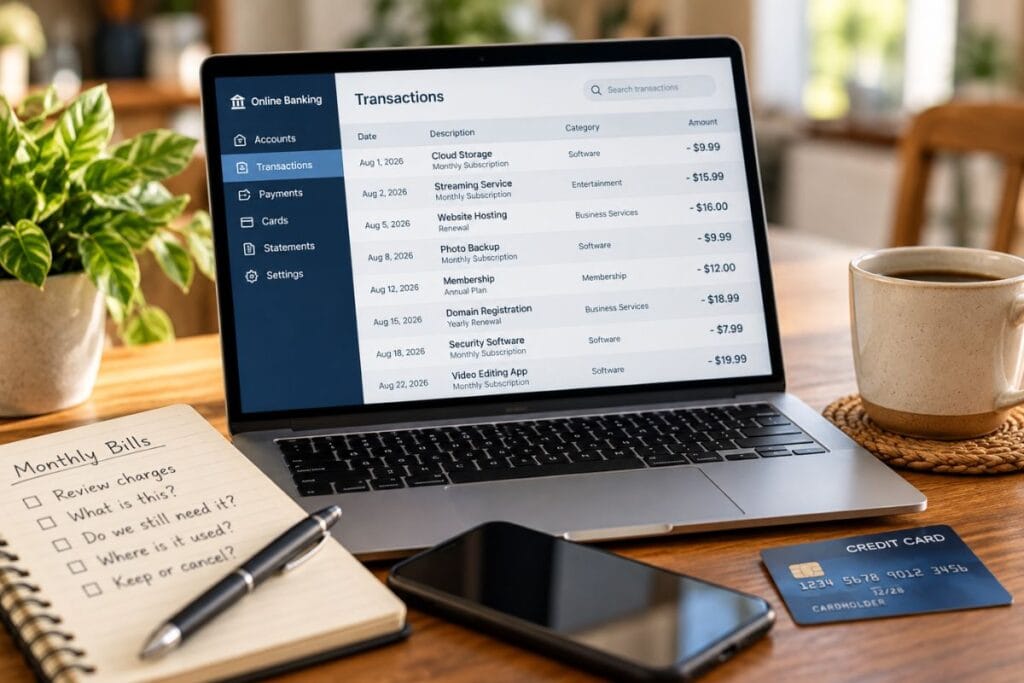
A $16 charge might be Netflix and something that can eventually be canceled. But another $16 charge could be keeping your family’s photo library in cloud storage, maintaining an important email account or paying for a phone number needed for two-factor authentication.
Don’t leave the person handling your affairs with a bank or credit-card statement and expect them to figure out what every charge means. For important recurring payments, identify what the payment is for, what it keeps active, and whether anything needs to happen before you cancel it.
The goal is simple: make sure they understand what they’re shutting down before they shut it down.
Make Sure Someone Knows What Each Payment Is For
Recurring payments are another area where a little information in your digital-afterlife plan can save the person handling your affairs a lot of guesswork. A charge that looks like an ordinary subscription may be tied to something important, and you may not be able to tell just by looking at a bank or credit-card statement.
For each recurring payment, identify what you’re paying for and why it matters. Is it simply a subscription that can eventually be canceled, or is it paying for cloud storage that holds family photographs, hosting a website that may have value, maintaining an important email account or providing another service that needs attention?
Your plan doesn’t need to predict exactly when to stop every payment. Instead, record enough information for someone to understand what the payment is for, what depends on it, and whether anything needs to happen before canceling it.
Some subscriptions may be easy to cancel after your death. Others may need to remain active while important information is preserved, accounts or assets are handled, or the person settling your affairs decides what happens next.
The goal is to make sure they aren’t left looking at an unfamiliar charge and wondering whether it’s safe to cancel. Give them enough information to understand what they’re shutting down before they shut it down.
Don’t Disconnect the Phone Too Quickly Either
Your phone number may be much more than a way for people to call you. Many email, banking, social-media, and other online accounts use two-factor authentication (2FA), which may send a code to your phone to confirm your identity before allowing access.
If the phone service is disconnected too quickly, the person handling your affairs could lose an important way to complete that two-factor authentication and access an account they are authorized to manage.
That doesn’t mean a phone number should stay active forever. It means understanding what depends on it before shutting it down.
The same thinking applies to primary email accounts. An inbox can serve as a roadmap to someone’s digital life, with account notices, receipts, client correspondence, renewal reminders, and recovery emails that can help identify accounts and obligations you may not have known existed.

Your Family Photos May Be One of Your Most Valuable Digital Assets
Digital photographs are easy to overlook when thinking about a digital afterlife because we don’t usually think of them as an account or financial asset. But for many families, years—or even decades—of photographs now exist only on phones, computers, external drives or in cloud storage. If no one knows where those photographs are stored or which account protects them, part of a family’s history could be lost.
This became personal for us when we thought about where our own photographs are stored. Years ago, we had a problem with an external drive, and after that, our photographs and documents started going into Google storage. We have family photographs there dating back to at least 2000, and probably earlier.
Our children may not want all of those photographs today, but our grandchildren may feel differently 20 or 30 years from now. Those files may have little traditional financial value, but they are part of our family’s history. We don’t want someone deleting the Google account without realizing what would disappear with it.

Google offers an Inactive Account Manager that lets you choose trusted contacts and specify certain data they can receive after your account has been inactive for a period you select. Google currently allows up to 10 trusted contacts. Google also states that if a deceased person’s account is closed, it cannot later fulfill a request to turn over the account’s contents.
Because Google states that if a deceased person’s account is closed, it cannot later fulfill a request to turn over the account’s contents, our instructions must be clear: preserve the photographs first, then close the account later.
But simply leaving the account alone isn’t necessarily a long-term preservation plan either. Google reserves the right to delete an inactive personal Google Account and its data after at least two years of inactivity, subject to certain exceptions. That’s another reason your digital-afterlife plan should identify what needs to be preserved and leave instructions for where those photographs or files should ultimately be stored.
Your Social Media Is Part of Your Story Too
Social media accounts can hold years of photographs, conversations, friendships and memories. For some of us, they have become a record of different parts of our lives. Deciding what happens to those accounts after death is another part of digital-afterlife planning, and it’s a decision worth making while you can still make it for yourself.
For me, this is something I would want preserved. My personal Facebook account contains years of quotes, family interactions, friendships, conversations and pieces of my social history. I would want that history available for our children and grandchildren.
Not everyone will feel the same way. Some people may want their social accounts deleted after death, while others may want them preserved or memorialized.
Facebook allows profiles to be memorialized. Depending on the account’s privacy settings, friends can continue sharing memories on a memorialized timeline, while the deceased person’s existing posts and photos remain visible to their original audiences. Facebook also allows users to choose a legacy contact who can perform certain tasks for a memorialized profile, although that person cannot log in as the deceased or read private messages.
That gives us choices now, rather than leaving someone else to guess later.
What you want may be completely different. The important thing is deciding for yourself now, so someone you love isn’t left trying to figure it out later.
Websites, Domains and Online Businesses Shouldn’t Be Treated Like Subscriptions
Websites, blogs, and other online businesses can be easy to misunderstand if the person handling your affairs wasn’t involved in running them. From the outside, a website may look like nothing more than a collection of monthly and annual expenses for hosting, domain registration, plugins, email, and software. Canceling those charges might seem like an easy way to stop unnecessary bills.
But those payments may be keeping an asset alive.
An established website can have years of content, search-engine traffic, a recognizable domain name, an email list, advertising or affiliate income, social-media accounts, and other things that give it value. Even a website that isn’t currently making much money could have a domain, content library, or audience that someone else would be interested in buying.

Know What Keeps the Website Running
Several different pieces can keep a website running. One company may register the domain while another hosts the website. Email may be handled somewhere else. Plugins, security services, backups, and other software may each have their own accounts and renewal dates.
Canceling one service without understanding how everything is connected could take the site offline or make it much harder to transfer later.
This is an important part of our own planning. We own websites and have spent years creating the content on them. If something happened to both of us, we wouldn’t expect our son to learn how to operate those sites or keep producing content indefinitely. But we also wouldn’t want him to assume that shutting everything down was the right answer.
We would want him to have the websites and domains evaluated and explore whether they, along with their content and other related assets, could be sold.
To do that, he would need to know:
- Where the domains are registered
- Where the websites are hosted
- What services keep them running
- Which accounts generate income
- What other accounts are connected to the websites
- Who he can contact for help
Most importantly, don’t cancel hosting, and don’t let important domains expire while he’s figuring out what the sites are worth and what can be transferred. Once a website goes offline or a domain is lost, preserving or selling what you’ve built becomes much harder.
Don’t Forget the Accounts Connected to the Business
Business social media, email, and video accounts may need their own instructions. For example, YouTube channels connected to a Brand Account can have multiple managers or owners, so planning ahead may allow another authorized person to manage the channel without simply handing over a password. How you manage or transfer an account depends on the platform and how you originally set it up.
Not everyone who owns a website wants to sell it. A personal blog might be preserved as a family record. A business site might need to remain online while the business is sold or wound down. Another site may have little value and can eventually be closed.
The important thing isn’t deciding whether to keep or sell every website. It’s making sure the person handling your affairs knows what you own, what keeps it running, whether it may have value, and what you want them to do with it.
Don’t Forget Money That May Still Be Coming In
It’s easy to focus on the money going out after a death, bills, subscriptions, and recurring charges, and overlook money that may still be coming in.
Think about the deposits that normally show up in your accounts. You may receive Social Security or other government benefits, a pension, retirement payments, an annuity, or investment income. You may also receive a refund, unpaid wages, or other money you’re still entitled to.
Other income sources can be much easier for someone else to miss. Depending on your situation, that could include:
- Social Security or other government benefits
- Pension or retirement payments
- Disability benefits
- Annuities
- Investment income or brokerage assets
- Unpaid wages
- Refunds
- Royalties
- Contract payments or client invoices
- Business receivables
- Affiliate commissions
- Social-media monetization
- Advertising revenue
The person handling your affairs needs to know what normally comes in, where it comes from and where it goes.
That doesn’t mean every payment should continue after death. Some benefits may need to be reported and stopped, while other income may still be owed to your estate or could lead to benefits for a surviving family member. The rules depend on the type of income, so your plan should help the person handling your affairs know what exists and who to contact to find out what happens next.
We realized how easy it is to miss some of this when we looked at our own income. Someone handling our affairs would probably find our obvious bank accounts and creditors. But would they know some of our social accounts are monetized? Would they know an affiliate payment was still outstanding?
Maybe not.
If nobody knows to look for the money, it’s much easier to miss.
Look in the Digital Drawer
Most of us have what you might call a digital drawer. It may be a literal drawer, a box in a closet, or an office shelf filled with old phones, USB drives, laptops, external hard drives, SD cards, tablets, and other electronics we’ve accumulated over the years. We keep them because we might need something from them someday, or simply because we’re not quite sure what to do with them.
We hadn’t really considered those old devices in our digital-afterlife planning, but we should. An old phone or hard drive could contain family photographs, documents, account information, saved passwords, or files that exist nowhere else. An older phone might even have an authenticator app that once accessed an important account.
Think about what would happen to those devices if someone else eventually had to clean out your home. Would they know which ones contain something important, or would they simply see a box of old technology that can be donated, recycled, or thrown away?

Your digital-afterlife plan should identify old devices that may contain something worth preserving and help the person handling your affairs know what to look for. You don’t necessarily need to catalog every old USB drive in the house, but if you know an external drive contains years of family photographs or an old laptop holds important business files, make sure someone else knows that too.
Your instructions can also explain what should eventually happen to the devices themselves. If a phone, computer, or drive can be sold, donated, or recycled after you’ve preserved anything important, note that it should be properly cleared first. Simply deleting files may not be enough. The Cybersecurity and Infrastructure Security Agency warns that deleted information may still be recoverable and recommends properly clearing devices before reusing or discarding them.
That old drawer full of technology may not look particularly important, but it could contain pieces of your financial life, family history, or digital identity that exist nowhere else. Including those devices in your plan can keep something important from disappearing simply because no one knew it was there.
Cryptocurrency Needs Its Own Plan
Cryptocurrency deserves special attention in a digital-afterlife plan because access can work very differently from a traditional bank or investment account. Depending on how the assets are held, someone may need more than an account name and password to find and access them.
Assets held in a private wallet may depend on a private key, recovery phrase, hardware wallet, or other information that cannot simply be recovered by calling a company and providing a death certificate. Without the right information, those assets could become difficult—or sometimes impossible—to access.
Your plan should identify which cryptocurrency or digital assets exist, where they are held, and where the authorized person can find the instructions needed to manage them. This might include assets held through an exchange as well as cryptocurrency stored in a private or hardware wallet.
Protect sensitive information such as private keys and recovery phrases separately, rather than writing it directly into an unsecured digital-afterlife plan. Your trusted person needs to know where the secure access information is located and how to obtain it when authorized, without unnecessarily exposing those credentials today.
For significant cryptocurrency holdings, it may also be worth discussing your plan with your estate-planning attorney, tax professional, or financial advisor so they can handle the assets appropriately as part of your estate.
What About Things You Want to Keep Private?
Not everything in your digital life needs to become part of the family archive. You may have personal correspondence, private photographs, journals, old documents, or other files that you would prefer not to have preserved or shared after your death. A digital-afterlife plan lets you make those wishes clear instead of leaving someone else to decide what should happen to them.
For some things, you may want to leave simple instructions such as “Preserve for family,” “Review only if needed to settle my affairs,” “Do not share,” “Delete after the estate is settled,” or “Give to this person.” Those instructions can help someone distinguish between something you intentionally wanted saved and something you expected to remain private.
You don’t need to put sensitive information or private material directly into your digital-afterlife document. Instead, the plan can identify where it is stored and provide instructions for how you want it handled. Deciding what should remain private is just as much a part of digital-afterlife planning as deciding what to preserve.
Digital Afterlife Planning Also Matters Before You Die
While working through our own plan, we realized that having access to everything still wouldn’t solve every problem. If one of us were suddenly incapacitated and unable to communicate, could the other step in and keep things moving?
In our case, the answer isn’t equal. One of us could take over much of what the other handles fairly easily. Reverse the situation, and the learning curve would be much steeper. The passwords might all be available, but that doesn’t explain which bills need paying, what needs attention this week, which clients are waiting for something, or what has to happen to keep a business or website running.
That’s why a digital-afterlife plan needs to provide more than account names and access information. It should also tell the person what to do with that information. If you list a website, explain whether it needs to stay online and who can help manage it. If you list a recurring payment, explain what it’s paying for and whether it should continue. If you identify a business account, explain who should be contacted and what needs immediate attention.
Think of the difference between leaving someone a set of keys and leaving them directions. The keys may get them through the door, but they don’t tell them what they’re supposed to do once they’re inside.
A good plan can therefore be useful during incapacity and after death. The circumstances may be different, but the person stepping in still needs to understand what you have, how to find it, and what happens next.
If you couldn’t communicate tomorrow, would someone know:
- Where your available money is?
- Which bills must continue?
- Where your health insurance information is?
- What appointments or jobs are already scheduled?
- Which calendar contains those commitments?
- Which clients need to be contacted?
- What websites and services must stay running?
- Where can I find the information needed to keep things running?
Those are questions worth answering while you are still here.
Start Here, and Know What Can Wait
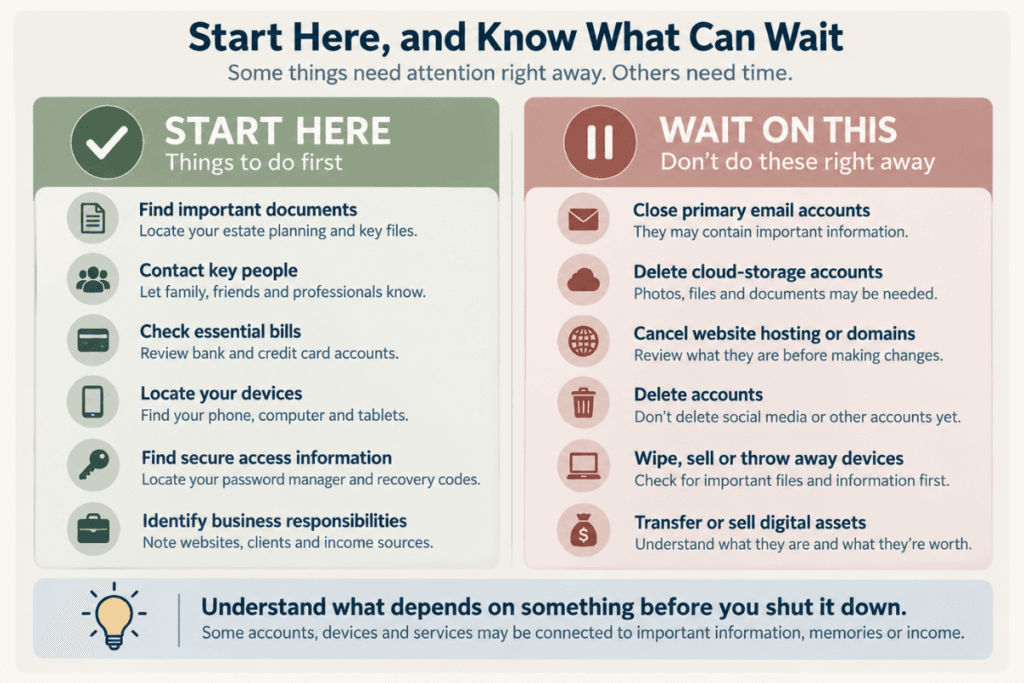
One of the most useful things you can leave behind is a simple first page telling someone where to start. When a person is suddenly stepping into your financial, digital or business life, a long list of accounts may be overwhelming. Give them a short list of the things that need attention first and point them toward the information they will need to handle them.
And don’t overwhelm yourself trying to create that list. You don’t need to inventory your entire digital life in one sitting. Start with the things someone would need first, then add the less urgent pieces over time.
Start With These Things
You don’t need to build your entire digital-afterlife plan today. Start by documenting the things someone would need first.
Then make the first page of your plan just as simple for them. Tell them what needs immediate attention, where to find the information they need, and what can wait.
Priorities will differ for every family, but focus this first page on what may need attention right away. Your instructions might tell someone to:
- Locate your estate-planning and other important documents
- Contact the people you’ve identified to help
- Check available funds, incoming payments, and essential bills
- Review your primary email for bills, account notices, and other important messages
- Locate your phone and other devices that may be needed for two-factor authentication
- Check your calendar for upcoming appointments, commitments, or deadlines
If you have a business, website, or other responsibilities that can’t simply stop, include those immediate instructions here too. That might mean contacting clients or an employer, keeping a website or domain active, or making sure someone knows who to call for help.
The goal isn’t to give someone everything they could possibly need on the first page. It’s to tell them where to start.
Tell Them What Can Wait
Your plan should also identify things the person handling your affairs shouldn’t do until they understand what depends on them.
For example, you may want to tell them not to immediately:
- Close primary email accounts
- Delete cloud-storage accounts
- Cancel every recurring charge
- Cancel website hosting
- Allow important domains to expire
- Delete monetized accounts
- Wipe, sell or throw away old devices
- Shut down something connected to income
- Sell or transfer digital assets before understanding what they are
The exact timeline will be different for every situation. Some things may be handled quickly, while others may need to remain in place until accounts have been reviewed, information has been preserved, and the appropriate people have been contacted.
Your Digital Afterlife Plan Is Not Your Will
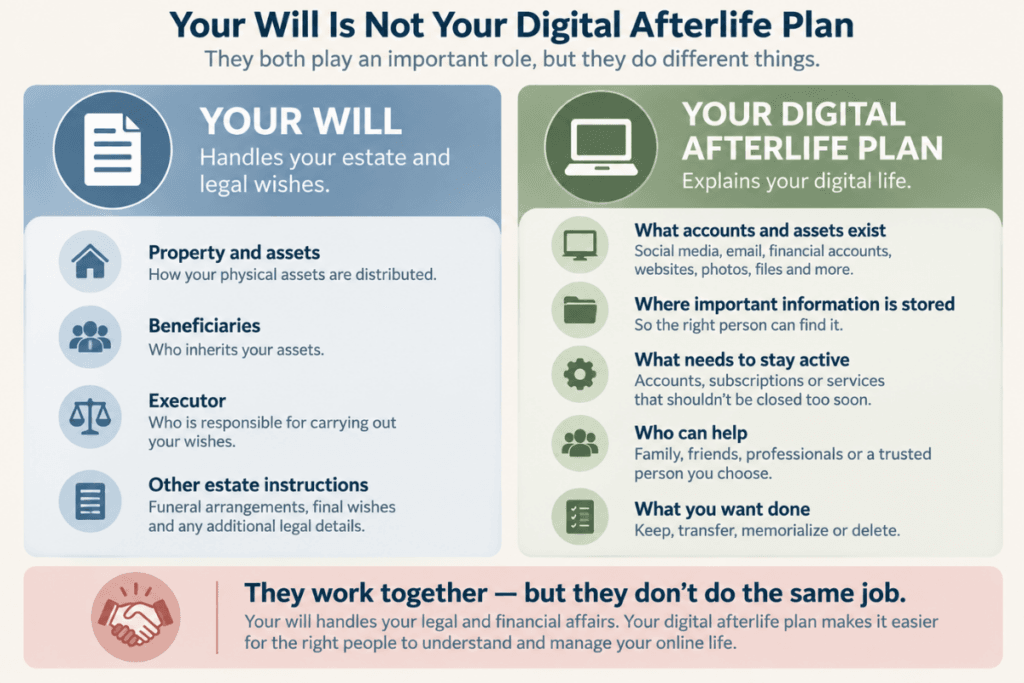
Your digital-afterlife plan tells people what exists, where it is, what you want to happen and where to get help. But the plan itself does not necessarily give someone the legal authority to carry out those wishes or determine who inherits an asset.
Your estate documents help establish who has authority and how property passes after your death.
The same is true of passwords. Giving someone your password does not automatically give them permission or legal authority to manage everything in the account.
Platform terms, estate documents, state law and the type of information involved can all matter.
For example, Pennsylvania has adopted the Revised Uniform Fiduciary Access to Digital Assets Act, which addresses access to digital assets by executors, agents under powers of attorney, trustees, and other fiduciaries. It also recognizes user directions and terms-of-service agreements in determining disclosure and access.
Other states have their own applicable laws.
Some companies also provide their own planning tools. Apple, for example, allows users to designate one or more Legacy Contacts who can request access to certain Apple Account data after death using an access key and death certificate. Some information, including passwords and passkeys stored in iCloud Keychain and certain purchased digital media, is excluded.
That is why you should discuss digital planning with your estate-planning attorney when you create or update your will, power of attorney, or other estate documents.
Ask specifically whether the people you have chosen have the appropriate authority to handle digital assets, electronic communications, and online accounts during incapacity and after death.
Your Digital Afterlife Will Look Different From Mine
This may be one of the most important lessons we learned. Our family photographs matter enormously to us, and we want to make sure they’re preserved. Our websites may have value, so rather than simply shutting them down, we would want someone to evaluate whether they could be sold. I also have years of personal history on Facebook that I wouldn’t want to simply disappear.
On the other hand, we don’t have significant airline miles or digital purchases to worry about, and we don’t currently own cryptocurrency. But your digital life could look completely different from ours. You might have 800,000 airline miles, a cryptocurrency wallet, decades of personal email, valuable gaming assets, or family photographs stored on an external drive that nobody else even knows exists.
There isn’t one correct list of things everyone needs to save, sell, transfer, or close. The important part is deciding what matters to you and leaving clear instructions, rather than leaving those decisions to someone who may already be grieving, overwhelmed, and trying to figure out your digital life without you.
Create a Digital Afterlife Plan
By this point, it can feel like there is a lot to think about, but creating a digital afterlife plan doesn’t have to be complicated. You’re really creating a roadmap for the person who may someday have to step into your digital life without you there to answer questions.
A good plan isn’t just a list of accounts and passwords. It should give that person enough information to understand what you have, where to find it, and, most importantly, what you want done with it.
Your digital afterlife plan should help them answer questions like:
- What do you have?
- Where can I find it?
- How can I access what I’m authorized to access?
- What should I preserve?
- What should stay active for now?
- What has financial value?
- What should be transferred or sold?
- What should be memorialized?
- What can eventually be closed or deleted?
- What should remain private?
- Who do I contact when I need help?
- What should I NOT do yet?
That last question may be one of the most important. Closing an email account, canceling a service, or deleting an online profile too quickly could make something else harder to find or access later.
Choosing the Right Person
Your trusted person might be your spouse or partner, an adult child, your executor, the person you’ve named to act under a power of attorney, or someone else you trust. Depending on your situation, more than one person may ultimately be involved.
And don’t assume the person you choose needs to know how to handle everything in your digital life. Their job may simply be to know what exists, where your instructions are, and who to call for help.
If you own a website, for example, the person handling your affairs doesn’t need to know how to manage the hosting, transfer a domain or evaluate what the site is worth. Your plan can tell him who does.

The same could apply to a business, financial accounts, cryptocurrency or other things that require specialized knowledge. Include the names and contact information of people who can help, along with a short explanation of what they can help with and when they should be contacted.
Finally, treat your digital afterlife plan as a living document. Review it at least once a year and whenever something important changes. If you add a new account, change where passwords are stored, buy cryptocurrency, launch a website or sell one, update the plan.
When you change the person you trust to handle things, update it.
A five-year-old digital-afterlife plan can create almost as much confusion as having no plan at all.
Tell Them What to Say or Ask
For some accounts and relationships, it may also help to leave a few words about what the person handling your affairs should say or ask when they make contact. They don’t need a script for every subscription or online account, but a little direction can prevent confusion or a costly mistake.
For example:
- Website: Contact Jane Smith at XYZ Web Services. Tell her what has happened and that the family wants the websites kept online while their value is evaluated.
- Business: Contact Joe. He knows the equipment and can help determine what may have value and how to sell it.
- Online account: Contact the provider and ask about its procedure for handling the account after a death. Don’t simply log in and delete the account.
- Financial or professional account: Tell them what happened and ask what documents they need from the executor or other authorized person before changing or transferring anything.
You don’t have to anticipate every conversation. The goal is to leave enough information that the person handling your affairs knows who to contact, why they’re contacting them, and what they need to find out.
And don’t hide your plan so well that nobody knows it exists. Tell your trusted person where it is and make sure they know where secure access information is stored. Name a backup person, too, in case your first choice can’t serve.
You Don’t Have to Figure It All Out Today
We didn’t. We started this process thinking we needed an account list and passwords, but the more we talked about it, the more we discovered questions we hadn’t thought to ask.
What happens to our family photographs? What keeps our websites running? What shouldn’t be canceled right away? Is there money still coming in? What’s sitting on those old devices tucked away in a drawer? What should remain private? What happens if one of us is still alive but unable to communicate? And perhaps most importantly, would the person we trust to handle all of this actually know where to start?
Those are the kinds of questions a digital afterlife plan should answer, and you don’t have to solve them all in one afternoon. Start by figuring out what you have. From there, decide what matters to you, what needs protection, and what you want someone to do with it when you can no longer do it yourself.
If You Do Nothing Else Today, Start With These Five Things
- Identify your primary email, phone, and password system. Make sure someone knows what they are and where to find the information needed to access them.
- List your most important accounts and digital assets. Start with financial accounts, important subscriptions, websites or businesses, social media, and anything with financial or sentimental value.
- Identify where your photographs and important files are stored. Include cloud storage as well as computers, phones, and external drives.
- Write down what shouldn’t be canceled or deleted right away. Think about your primary email, phone service, cloud storage, website hosting, domains, and anything else another account or asset depends on.
- Tell one trusted person where to find your plan. Make sure they also know where your secure access information is stored and how to get help if they need it.
That’s enough to get started. You can add accounts, instructions, contacts, and decisions as you work through the rest of your digital life. The goal isn’t to finish everything today. It’s to make sure the person who may someday have to handle it isn’t starting from nothing.
The greatest gift of a digital afterlife plan isn’t a list of passwords. It’s leaving behind clear instructions when the person you love would otherwise be left guessing.
Ready to Start Your Own Digital Afterlife Plan?
You don’t have to organize your entire digital life today—or start with a blank page wondering what you’ve forgotten.
We created a Digital Afterlife Starter Kit to help you identify your important accounts and digital assets, record where critical access information is stored, and leave clearer instructions for the person who may someday need them.
It’s a starting point you can build on over time as you decide what you have, what matters, and what you want to happen to it.
Enter your email below, and we’ll send you the Digital Afterlife Starter Kit as a free download. You’ll also receive our monthly newsletter with practical planning resources, new guides and articles to help you prepare for the things families don’t always know they need to talk about.

Get the Free Digital Afterlife Starter Kit
Enter your first name and email below and we’ll send the printable Starter Kit directly to your inbox.

Maureen Wright
Writer & Family Planning Advocate
Maureen Wright writes about end-of-life planning from the perspective of the families who eventually have to put those plans into action.
She focuses on turning complicated or uncomfortable topics into practical steps families can understand, discuss, and use.
Her work for FuneralPlanningInfo.com draws on careful research, personal experience, and collaboration with funeral service professionals and family support specialists.
Maureen’s focus: Planning ahead • Digital afterlife • Family conversations • Practical end-of-life preparation
